
Tinybeans Private Family Album
TinybeansParenting
3.72.02K Reviews
- Version
- 5.10.0-prod
- Installs
- 500.00K
- Age Rating
- Everyone
Screenshots





Our Review of Tinybeans Private Family Album
 Analysis by Appyee
When family photos are scattered across messages, camera rolls, and social feeds, keeping relatives in the loop can become a chore. Tinybeans Private Family Album gives that sharing a dedicated home: I see it as a family scrapbook designed for updates among people you choose, rather than a place to broadcast every moment publicly. That focus is useful, though it works best when everyone is happy to use one more app for family life.
A calmer alternative to group chats
Parents often send the same picture to several relatives, then find it again later in a long chat thread. A shared album can make those updates easier to revisit, especially for family members who want to follow along without joining every conversation. Compared with a public social feed, Tinybeans is centered on a selected circle; compared with a basic messaging group, it gives photos and family moments a more lasting, organized context.
The trade-off is that relatives need to engage with the sharing setup in some way. If your family already uses a messaging app comfortably and only exchanges an occasional photo, moving everyone to a separate space may feel like unnecessary housekeeping. I’d choose Tinybeans when regular updates and a growing family archive matter more than keeping everything inside existing chats.
Who gets the most from a family album
This is a natural fit for parents who take plenty of photos and want grandparents, a co-parent, or other close relatives to follow a child’s day-to-day changes. It can also suit families living far apart, where small updates help relatives feel present between visits. The app is free to start, and Tinybeans is the developer behind it; its Parenting focus makes clear that the central use is sharing family life, not editing images or managing a general-purpose cloud drive.
I’d be less inclined to recommend it to someone who wants a private backup for every file on a phone, a sophisticated photo editor, or a tool for coordinating schedules and tasks. An album is not a substitute for keeping your own copies of important images. If the main goal is simply to send one funny picture now and then, your current chat may be quicker and easier.
A realistic routine, not another project
Picture a parent taking a few photos during a busy morning: breakfast, a walk, and a new drawing brought home later. Instead of sending each image to several relatives separately, they can choose what belongs in the family album and add a short note when a detail might otherwise be forgotten. A grandparent can catch up when convenient, while the parent avoids repeating the same update across multiple conversations.
My practical tip is to treat the album as a selective record, not a live feed that must document everything. A handful of meaningful moments is easier to maintain and more pleasant for relatives to browse later. Before inviting people, decide who should see family updates and whether everyone understands that access is intended for a private circle. That small bit of planning helps avoid awkwardness around sharing children’s photos.
What to consider before inviting relatives
Privacy is a central reason to choose a family album, but I would still be thoughtful about what I post. A private audience is not the same as a guarantee that an image can never be copied or shown elsewhere. Share only what you are comfortable circulating among the people you invite, and revisit who has access as family circumstances change.
It is also worth considering how relatives prefer to receive updates. Some will happily browse an app; others may find email more familiar. Tinybeans includes email updates for relatives, which can make participation easier for less confident smartphone users. If someone still struggles with app-based services, though, they may need a little help getting comfortable with the arrangement.
Why Tinybeans Stands Out
So, what’s the big deal with Tinybeans Private Family Album? First off, it’s all about privacy. In a world where everything seems to be public, this app keeps your family’s moments tucked away safely. You can share photos, videos, and milestones without worrying about them ending up in the wrong hands. Plus, it’s super easy to invite family members to join your album and keep everyone in the loop.
Easy Peasy Setup
Let’s talk setup. Honestly, I was up and running in no time. Just download it from your favorite app store, and you’re good to go. The interface is intuitive, so you don’t need to be a tech wizard to navigate through it. Adding family members is a breeze, and the app’s notifications ensure nobody misses out on those cute baby giggles or first steps.
The app has been available since October 2013, and its current Android release is 5.9.5-prod, with Android 8.0 as the minimum system requirement. I would check that requirement before recommending installation on an older device. Tinybeans is free to download, rated for Everyone, and offers optional in-app purchases ranging from $4.49 to $74.99 per item. Those purchases make it sensible to check the available options in the app before assuming every extra is included at no cost.
A Walk Down Memory Lane
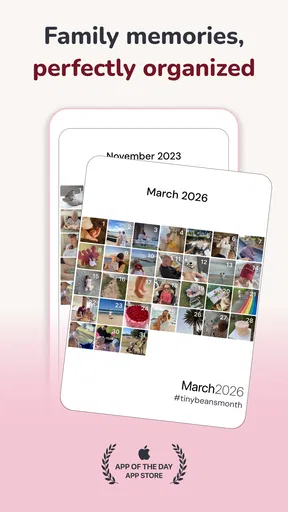
One of my favorite features is the timeline. It’s like having a personal historian documenting your family’s journey. You can scroll back and relive moments, which is perfect for those nostalgic evenings. And if you’re into organization, the app lets you tag and sort photos by date or event, making it super easy to find that one specific memory.
That organization becomes more useful as the album grows. If I know a photo belongs to a holiday, a school change, or a particular family visit, adding context while I still remember it can save searching later. I’d use the timeline for browsing and the available organization tools to narrow down a memory when I have a specific moment in mind.
Milestones and Memories
Another cool thing? The app lets you track milestones. Whether it’s the first tooth or the first day at school, you can document it all. There’s something heartwarming about looking back and seeing how your little one has grown. Plus, it gives you prompts to record moments you might otherwise overlook.
Those prompts can help when ordinary days blur together, but they should feel like inspiration rather than a checklist. There is no need to turn family life into a constant documentation task. I’d add a milestone when it matters to me, then let the rest of the album capture the unplanned moments that make a family record feel personal.
Grandparents Will Love It
We all know how much grandparents love to see what the grandkids are up to. With Tinybeans, they can stay updated without needing to navigate complicated tech. The app sends them email updates, so even if they’re not super tech-savvy, they can still enjoy all the adorable updates.
For a relative who prefers email, this can reduce the pressure to learn a new routine just to see family photos. I would still ask what works for them: email may be enough for someone who wants occasional highlights, while a relative who enjoys browsing the whole archive may prefer using the app. Matching the method to the person is more considerate than assuming every family member wants the same level of access or frequency.
Security and Peace of Mind
Security is a biggie, right? Tinybeans takes it seriously. The app ensures only the people you invite can see your family’s moments. You can even control who sees what. It’s like having a virtual fence around your backyard BBQ—only invited guests are allowed.
That sense of a chosen audience is valuable, but I would not treat any online album as a reason to stop thinking about privacy. Be selective about invitations, especially when sharing pictures of children, and make sure relatives know the album is meant for the family circle. If someone wants to post images publicly or forward them widely, agree on boundaries before adding them.
The Little Extras
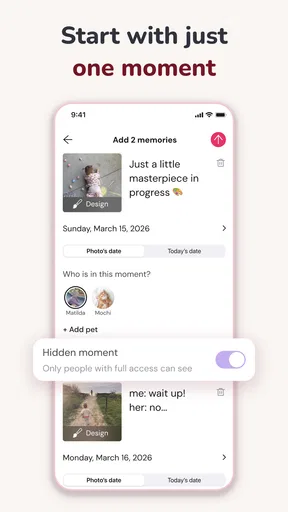
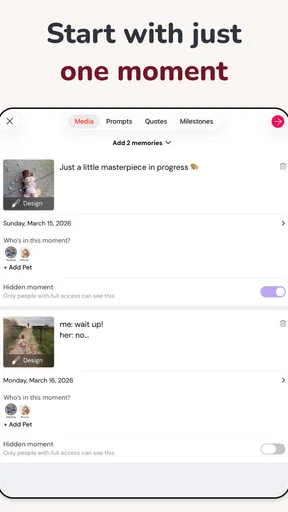
Oh, and did I mention the journaling feature? You can jot down thoughts or little anecdotes alongside your photos. It’s like adding a personal touch to each snapshot. Plus, there’s the option to print photo books, so you can have a physical copy to flip through during family gatherings.
A short note can make an image more meaningful months later: where you were, what made the moment funny, or what a child said at the time. I would keep entries brief enough to write while the memory is fresh. If you want a paper keepsake, photo books offer a different kind of value from scrolling through a screen, but they are an optional extra rather than a reason everyone needs to use the app.
Speed, stability, and everyday demands
For this kind of app, the experience depends on more than how quickly a screen opens. Browsing a family album is usually a light task, while adding a batch of photos or catching up on a long-running archive asks more of the device and connection. I would use Tinybeans for deliberate sharing and revisiting memories, not assume that every large upload will feel instant in every situation.
When several relatives are checking updates around a family event, the app’s usefulness comes from having one place to look rather than from everyone needing to send replies. A practical workflow is to select a few photos after the event, add context while it is fresh, and let relatives browse when they have time. That avoids turning an outing into a stream of uploads and keeps the album more readable.
I can’t promise that every device or network will behave identically, so I’d judge reliability by trying a small upload and checking that invited relatives can see it before relying on the album for an important update. Keep original photos in your own device or backup as well; a shared album is convenient for family access, but it should not be your only copy of precious images. This is a sensible safeguard for any photo-sharing routine.
Performance verdict
Tinybeans has a strong purpose when family members want a private-feeling place for photos, videos, milestones, and small written memories. The Android minimum of 8.0 may rule it out on older phones, and the optional purchases mean I would review the choices before paying for extras. It has a 3.9 average from around five thousand ratings, with roughly two thousand written reviews and more than 500,000 installs, so it has an established audience, though those figures alone cannot tell me whether it will suit a particular family.
My recommendation is to start with a small group and a manageable posting habit. If the album makes it easier to share meaningful moments without scattering them through public feeds and chat threads, it is doing its job. If your family does not want another place to check, or you mainly need a dependable personal archive, a familiar messaging service or a dedicated backup option may be a better match.
Wrapping It Up
All in all, Tinybeans Private Family Album is a gem for families wanting to cherish and share their moments securely. Whether you’re a new parent wanting to document every milestone or a grandparent eager to see your grandkids’ adventures, this app is a delightful choice. It’s easy to use, keeps your memories safe, and best of all, it brings families closer together—even when they’re miles apart.
So, if you’re looking for a digital sanctuary for your family’s memories, give Tinybeans a whirl. Trust me, you’ll love it!
Verdict
Strengths of Tinybeans Private Family Album
- Easy photo and video sharing.
- Secure, private family network.
- Simple, intuitive interface.
- Milestone tracking features.
- Ad-free experience.
Limitations of Tinybeans Private Family Album
- Limited free storage space.
- No offline access to albums.
- Occasional app performance lags.
- Subscription required for extras.
- Photo uploads can be slow.
Other Releases by Tinybeans
View All
Qeepsake: Family Photo Album
Parenting4.5
Similar Picks in This Category
View All
Family Space
Motorola Mobility LLC.3.9

شرطة الأطفال - مكالمة وهمية
Oub Apps4.1

Findmykids: Parental Control
LETEM LTD4.6

Pregnancy + | Tracker App
Philips Electronics UK Limited4.8

Policía de niños - para padres
Kids police4.7

Pregnancy App
Amila4.9
Frequently Asked Questions
What is Tinybeans Private Family Album?
Tinybeans is a private family photo-sharing app that allows users to document and share precious family moments safely. It's designed to create a secure space for families to store photos, videos, and milestones, making it easy to keep loved ones updated without exposing personal content on public platforms.
How does Tinybeans ensure the privacy of my family photos?
Tinybeans prioritizes user privacy by offering a secure platform where only invited family and friends can view shared content. The app employs encryption and strict privacy settings, ensuring that your family memories remain protected and visible only to those you choose to share them with.
Can I access Tinybeans on multiple devices?
Yes, Tinybeans is accessible on multiple devices, including smartphones and tablets, across both iOS and Android platforms. This feature allows you and your family members to upload and view photos from anywhere, ensuring that cherished memories are always at your fingertips.
Does Tinybeans offer any additional features beyond photo sharing?
Tinybeans goes beyond photo sharing by allowing users to track developmental milestones, create photo books, and receive personalized photo printing options. The app also provides a journal feature, enabling parents to document and reflect on significant moments in their child's life.
Is there a cost associated with using Tinybeans?
Tinybeans offers a free version with basic features, but also provides a premium subscription that unlocks additional functionalities such as unlimited photo storage, video uploads, and enhanced sharing options. The premium version is designed for families who want a more comprehensive experience.
